Showing posts with label chdk. Show all posts

Monday, May 27, 2013

RC Control of Canon Cameras

If you've got a CHDK-enabled camera, here's a nice instructable that shows how to control it with an RC radio. It uses an Arduino Pro Mini to interface between the receiver and the camera USB.

Chris A. chimed in in the comment section noting that this functionality is now built into the APM software, and that there is a MAVLink command to trigger the camera shutter.

I have to say, even though as a practical matter I would use the APM to control this, it's interesting seeing the more bare-bones approach in this instructable.

Sunday, August 26, 2012

Activating Camera Shutter via CHDK

Mark VandeWettering over at Brainwagon gave me a CHDK clue... it's been sitting in my mailbox for a while, so let me get it up here:


It's been a while since I looked at this, but I don't think it's difficult at all. If you look at the "home made usb remote" cable: 

http://chdk.wikia.com/wiki/USB_Remote_Cable 

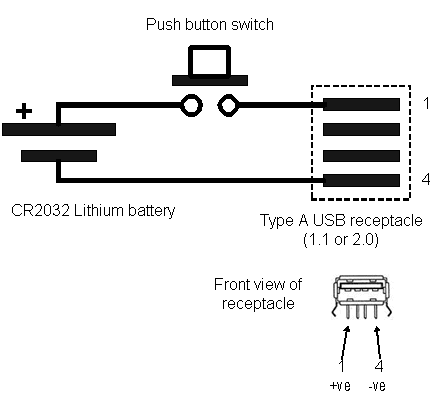
Basically, if chdk has the usb remote trigger support in it, it monitors V+ on the usb input port, and when it goes high, it triggers the shutter. So, just attach it directly to the arduino GND and any digital pin, and you should be able to trigger the shutter.

And related, Arduino Control for EOS Cameras.

Monday, April 16, 2012

CHDK Notes

Prepping for this trial, getting CHDK running on Andreas' camera.

Camera: Canon Powershot SD750
Memory Card: 16G

Prepping Card

  • simplest method is "firmware update"
  • needs to be reloaded each time the camera is powered on
  • may need to get a 2G card for "bootable"
Steps for Card
Here's the parameters I used for sdminst.  As per its instructions, I lock the card, and start the camera by pushing the play button.  I see the CHDK menu.

Pushing the top REC button puts the camera into alt mode.  Pressing menu in alt mode gives the CHDK menu.


It seems I can take pictures, but I haven't been able to find the pictures on the card after attaching it to the computer.

to be continued...


I'm Now I'm to the point where