Showing posts with label fpv. Show all posts

Tuesday, April 21, 2015

LED Spectator TV for FPV

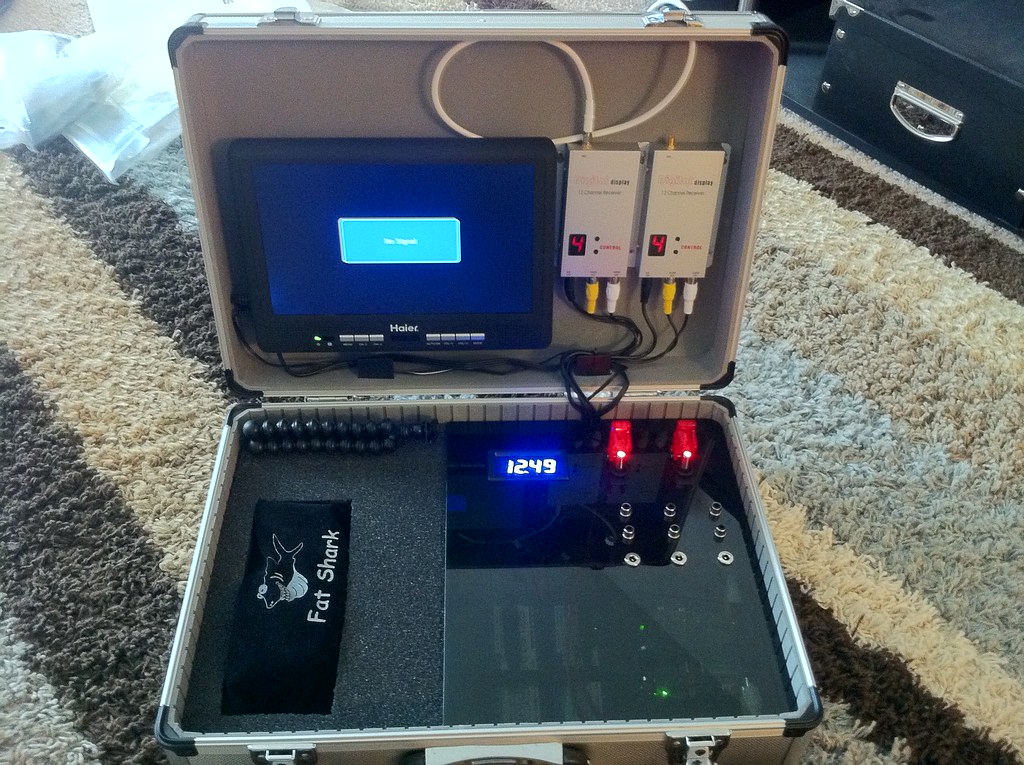
RCGroups member UniversalRC shows his external video setup.  It runs on 12V and has a beefy tripod mount.  He uses it so his aerial video clients can watch the imagery he's capturing.

The monitor runs off of  4500 mAh 3S battery. Here's the tripod.


blogodex = {"idx" : ["FPV, "external monitor"]};

Monday, May 19, 2014

Andreas, the MacGyver of FPV

Went out flying with Andreas and his nephew Nicholas, who was having his first FPV flight.  Snapped some pics to commemorate the occasion!
Setting up.
This is why Andreas is known as the MacGyver of Switzerland!
The joys of flight!


blogodex = {"index":["Andreas","Berkeley","FPV"]};

Saturday, April 28, 2012

RangeVideo 1.3GHz Video TX-RX

 Finally got my RangeVideo 1.3GHz electronics figured out and assembled... hooray!  Here's the camera, Tx, Rx, and video monitor. I'm using a Sony DVD player that a coworker was getting rid of as the monitor.  It's nice coz it's self-contained with its own battery.  It has video and audio input.  Just one problem, which I'll note below.
 Here's the Rx side.  I made a power cord so it can run off a 3S Lipo.  I'm planning on using the cheap 2.2mAh Turnigys, since the current draw is minimal.  The Rx is set to channel 9, 1280GHz.  That's the only channel legal in the U.S.  You need a Ham technical license to use it.  The channel indicator is almost totally black... hard to see even with the lights off.
 Notice the taped-over yellow RCA jack?  I lost hours trying to troubleshoot the setup, only to find out that my replacement cable for the DVD player was wired backwards -- the audio comes through the yellow jack and the video through the black one.  Troubleshooting everything was a pain, since I was integrating 4 new pieces that I had never used before.  Lesson learned: check the cables first!
Here's the Tx.  It's also running off a 3S.  The unit gets surprisingly hot, will need to find a way to keep it cool.  The camera is a Sony.  I had to make a cable for it.
 Here's the cable I made.  The board connector is a 1.5mm pitch Molex Picoblade.  Believe me, it wasn't easy to find that out!  The camera vendor sold double-ended pigtails.  Of course they didn't mention that anywhere, so it added about a month to research this and have the cable sent.  I snipped it in half and put a servo-style connector so that it would fit the RangeVideo cable harness.
I took the chance to measure the power consumption.  Subtracting the base usage of the watt meter (.3A, 4.0W at 12V), I measured the following numbers (all at 12V, which is what both the Tx and Rx use:

Rx: 0.3A, 3.7V
Tx + cam: 0.3A, 3.0V
cam (no Tx):  0.1A, .5W
 Here's another shot of the camera cable.  Hansen Hobbies sells the Pico connector but currently doesn't sell the crimping tool.  I ordered some connectors anyways... I'll see if there's any other way to crimp them.
Here's my power cable.  I snipped off the 2.1MM power connector from an old wall wart and soldered it onto an XT60 connector.  If you toss any old wall warts be sure and save this piece! Be careful to get your polarity right as well.

Saturday, April 14, 2012

Sunday, January 22, 2012

DIY FPV Goggles Update

 Part 1 here...

Here's the current state of the DIY goggles.  The distance to the screen seems about right for use either with or without glasses.
 Here's the view from the inside.  The screen has a resolution of 320x200.  It was $21, and looks about like you'd expect for that price. If it seems like a viable solution, I'll order a better screen.
Here's how it's attached... It was pretty straightforward.  I was going to make a slot down the metal strap so I could vary the distance easily, but this distance seems to work pretty well.

Next steps:  make a lightproof cover, figure out how to attach the battery and wiring, make a convenient connector to the receiver.


Wednesday, January 18, 2012

DIY FPV helmet, Part 1

I'm having problems fitting FPV goggles, coz I wear glasses.  So, based on an idea from Bruce, I'm going to try making my own ghetto version by attaching a video monitor to a welding helmet.

Here's the helmet I'm using. It was about $16 from Amazon, including shipping.
 Here's the welding glass cover pieces removed.  Now there's just an empty frame in the welding helmet.
 If I'm able to focus closely, I'll be able to attach the video screen right to the helmet.  This will be convenient coz I'll be able to flip it up.

I don't think I'll be able to get the monitor that close to my eyes, though.  I'll experiment to see the most comfortable distance with and without glasses.
Here's the headband.  It fits well and can be snugged up comfortably.  I think it might be better in this respect than commercial FPV goggles.
 Here's the head size adjustment screw.  There's also an adjustable strap that goes over the top of the head as well.
 And it's stylish!!  I'll take the inventory tag off, but I'm not sure how much it will help.  I'll also consider cutting the lower part off so my mouth is not covered.  It will make it easier to talk, and possibly keep my breath from fogging the inside of the display.
 Here's the 3.5 inch monitor I'm using for the first test.  It's the cheapest monitor on DealExtreme.  Resolution: 320x200, 12V.  It's not bad, but about what you would expect from a $22 monitor.
Here's how I'm thinking of mounting the monitor on the helmet. I'm thinking I can screw my hatcam on top as well.

Part 2 here...

Saturday, January 14, 2012

FPV equipment ordered from RangeVideo


Going to try two different Tx/Rx systems:

1.3GHz video Rx/Tx.  This requires a ham radio license, upcoming!


5.6GHz video Rx/Tx
Camera

not yet ordered.  will use gopro until I figure out which model is best.

Goggles

not yet ordered.  trying to figure out what's best for glasses


Monday, January 2, 2012

Layer Lens -- GoPro lens cover

This looks like it might be quite useful!  The Layer Lens is a lightweight cover that fits over the GoPro lens.  Here's the GoPro Lens Replacement Kit.


Sunday, October 30, 2011

GoPro FPV Setup (cables)

Output cable is: 2.5mm 4-pole jack
From inside, connections are: ground, video, audio, unused
yellow: video with shield (ground) , white: audio with shield (ground)
connecting to servo plug:

  • two grounds together, to servo black ("ground")
  • video, to white/bronw ("signal")
  • audio: to red ("power")

Two versions of off-the-shelf cables from ReadyMadeRC:


Nice tutorial from RCTestFlight:


Monday, July 18, 2011

CrazyJ's new FPV all-in-one ground station box

Looks very nice! Self-contained, self-powered, includes a 10-inch monitor as well as fat shark glasses.

Details on RCGroups.

Sunday, July 17, 2011

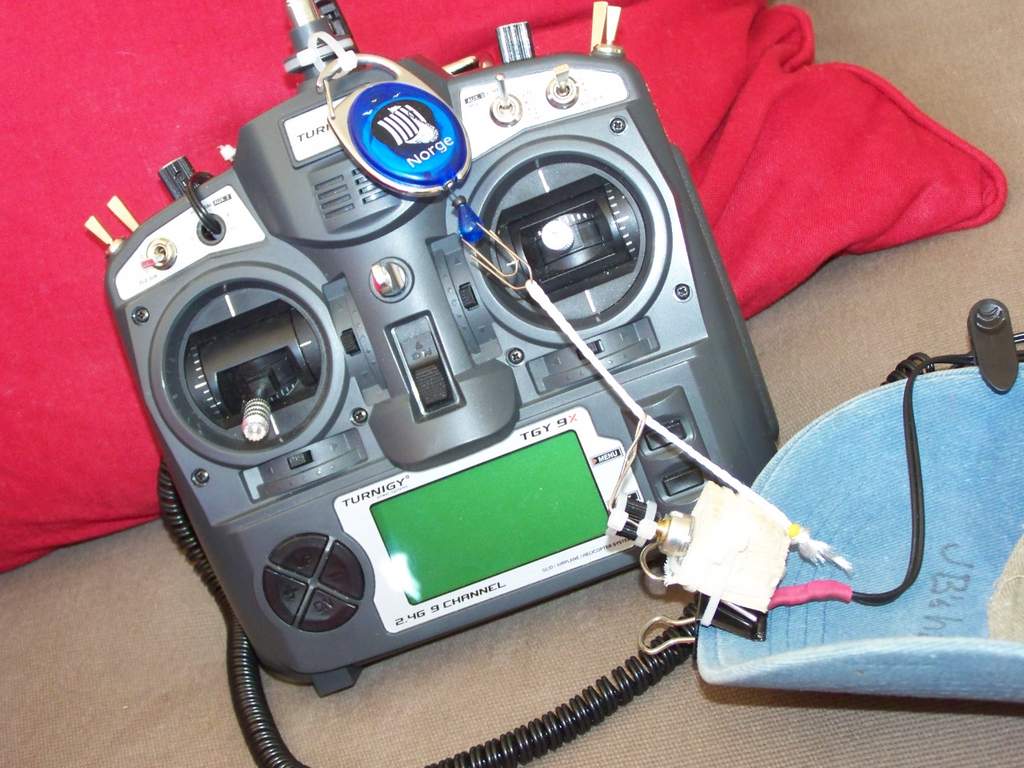
ScrtSqrl's cheap pan-only, crazy-simple, zero-drift Head Tracker

Here's the original CGroups link and an update where ScrtSqrl unveiled his nifty head tracker.  Genius!

Basic Idea:
  • take a control (e.g. flaps) pot out of your radio
  • extend the wires so it will reach your head
  • add a lever and attach it to your hat
  • add a bungee cord, attach to your radio
  • attach cam servo to appropriate channel (e.g. flaps) on radio
Now as you look at the radio, the servo will be centered, and as you move your head to the left or right the servo will follow along. Be sure and check out the update... there's a lot more information on his nicely portable FPV ground station.

Vimeo link: http://vimeo.com/925056

Thursday, March 17, 2011

FPV flight 2

Video to come, here's a still shot... I crashed right away, but Andreas did a great job flying with his newly-padded goggles.  The wind was pretty strong; he was able to hover almost directly overhead.

We fiddled with the patch antenna; it worked best to have someone (me in this case) kept it pointed at the plane.  The glitchy area was exactly in the plane of the flat part of the antenna.

Monday, March 7, 2011

First FPV flight!

Andreas received his FPV equipment (details forthcoming), and we went out to try it out at Chavez Park.  Brushless EasyStar (a wonderful plane, I can't wait for my brushless pieces to arrive from HK).

There was a Tibetan New Year Celebration at the same time... a lot of people in their beautiful Tibetan native costumes, and some appreciative kids telling us how cool we were.  I wish we could have overflown their celebration and got some shots, but safety first!

Chavez Park is nice for flying... Kite flyers stay on the Western side of the island (an old landfill), so we had the air above the Eastern half to ourselves.  There's a rise which blocks the wind, making this a great natural boundary.  Andreas flew during the FPV sessions, and I acted as spotter.  We mounted my OrangeRX Spectrum receiver and used my DX6i, which worked well.  There were transient video signal interruptions; Andreas has sent off for a patch antenna.

The GoPro was set at (mode ??? -- I'll get this from Andreas, 30 FPS).  The 2G card filled up with about 20 minutes of footage.  When the camera stopped recording, it still maintained a video signal to the transmitter.  Here's a quick edit; nothing too exciting, but not bad for a first go!

asdf
Update: got this list of equipment from Andreas...
may prettify the list later, but here's the URLs:

Saturday, January 29, 2011

RangeVideo!, Wireless video solutions.

RangeVideo.: "We are the premier distributor and developer of wireless A/V equipment and accessories. We tailor to the hobbyist by designing easy to use, long range, wireless video systems and accessories."

Thursday, January 27, 2011

Virgis21's very stable flight video

On RC Groups, 6500m LOS

"Used: Dragon OSD+, Dragon Link and FY-20A II fro stabilization (ailerons). Wingspan is 2.2m, battery 10 000mah. Lawmate 1.2ghz 1w, patch 8dbi on the ground. Camera: dx201 (default settings)."

Thursday, January 20, 2011